Install Legal IP-TV Providers Install on your Formuler Box / Device
FormulerZ boxes are one of the best devices for watching IP-TV. The most important advantage of FormulerZ boxes is supporting both MAC base Portal System and M3U base [...]
Legal IP-TV Providers . Mai 30, 2025 . Guide . 2 Min Read

FormulerZ boxes are one of the best devices for watching IP-TV.
The most important advantage of FormulerZ boxes is supporting both MAC base Portal System and M3U base Playlist.
FormulerZ8 is the last version of Formuler boxes with MYTV Online 2 application which support 4K Ultra HD streaming,
In this tutorial, we are going to show you how to bring IP-TV channels to your MYTV Online 2 on FormulerZ8.
https://www.iptvsmarters.com/download/?download=mac And Install the Application IP-TV Smarters Pro
This setup guide can be used for all models of Formuler devices/boxes:
STEP 1:
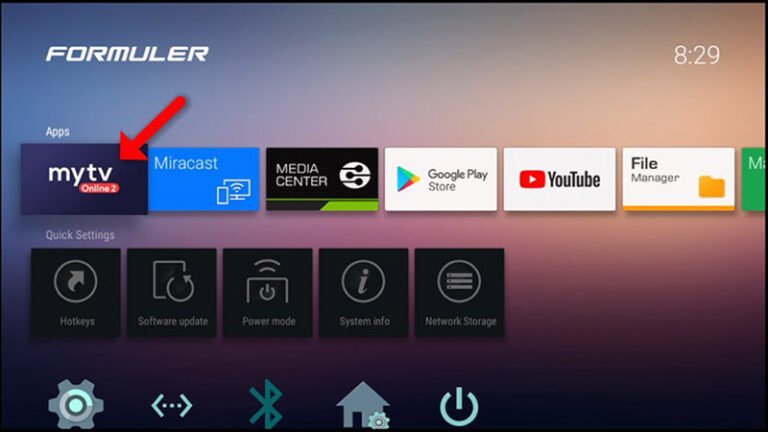
Open the exclusive application for watching IP-TV in Formuler boxes “MYTV Online 2”.
If you don’t have this application on your device you can download it from the Google Play store.
STEP 2 :
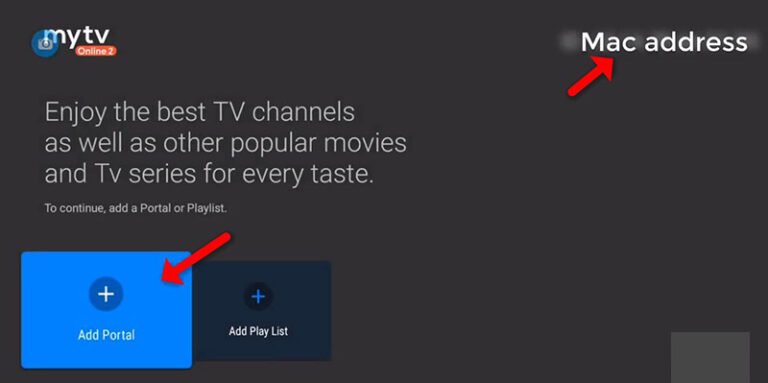
You can see the box’s MAC in the top right of this page.
Please note, this MAC address must be given to your IP-TV provider.
Here you can see the two options, select “Add Portal” to set the device as a MAC based device like MAG boxes.
STEP 3 :
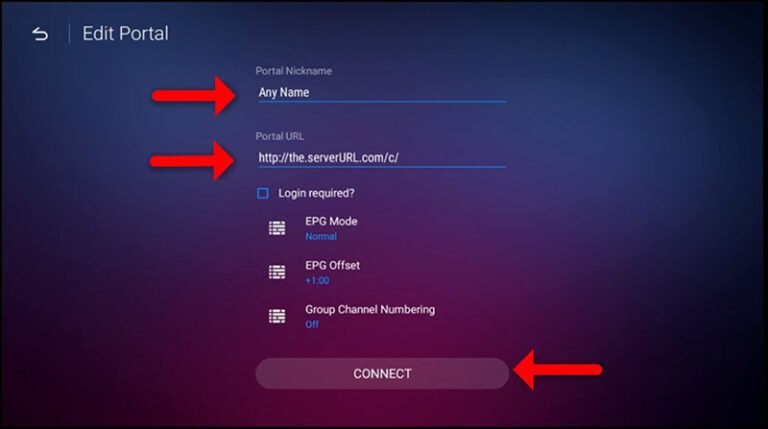
Enter Portal Nickname (Example: MYIPTV).
Enter IP-TV Portal URL you get from your IP-TV provider and click on “CONNECT”. You can ask for a portal URL from your IP-TV service provider.